
Dominik Lis, Marek Wrzesniak ABB Electrification, Smart Buildings Krakow, Poland, dominik.lis@pl.abb.com, marek.wrzesniak@pl.abb.com; Stefan Vogel ABB Low Voltage Products Heidelberg, Germany, stefan.vogel@de.abb.com
In today’s world, it is essential for residential and commercial buildings to manage energy usage proactively to achieve sustainability and lower costs. With energy savings of between 13 and 66 percent [1], intelligent efficiency applied to smart buildings is the ultimate way to boost sustainability and maximize building energy efficiency. If data is the currency needed, then these intelligent interconnected devices and systems used to accumulate, store, analyze and visualize relevant data are the transaction hubs and banks that make these energy assessments and savings possible. ABB’s EQmatic Energy Analyzer is just such a device for energy monitoring and diagnostics in today’s smart buildings. This compact solution is designed to monitor, log, visualize and analyze energy and consumption data originating from electric, gas, water or heat meters in homes, industries and facilities – anywhere meters can be installed.

The EQmatic range of analyzers
The EQmatic solution is available in three main models using either an M-Bus, Modbus or KNX communication protocol to accommodate the diversity of meters on the market →01. Individually configurable to web-based user interfaces, each EQmatic model is also available in two variations depending on the maximum number of connectable meters: 16 or 64. In this way, ABB offers a range of analyzers to fit the installation size and meter type customers utilize. Accurate monitoring of energy flows and costs allows customers to identify energy losses, thereby optimizing usage and reducing expenditures while fostering sustainability →02.

Released in 2018, EQmatic Energy Analyzer, is the first digital management solution for data collection via M-Bus meters. Customers benefit from rapid and easy installation and commissioning along with the support of ABB’s portfolio of energy management systems. Especially suited for companies that endeavor to fulfill ISO 50001 certification, the EQmatic Analyzer can be integrated with any meter (electric, gas, water or heat counters) independent of the meter manufacturer, via a customized meter configuration.
EQmatic main features:
• Automatic detection of ABB EQ meters (A- and B-Series) and M2M network analyzers
• Load control function, alarm function and monitoring of environmental parameters (KNX)
• Local data storage and data-sharing options • Integration into ABB AbilityTM EDCS
• Graphical data analysis via dashboard/chart diagrams and data export options
EQmatic hardware
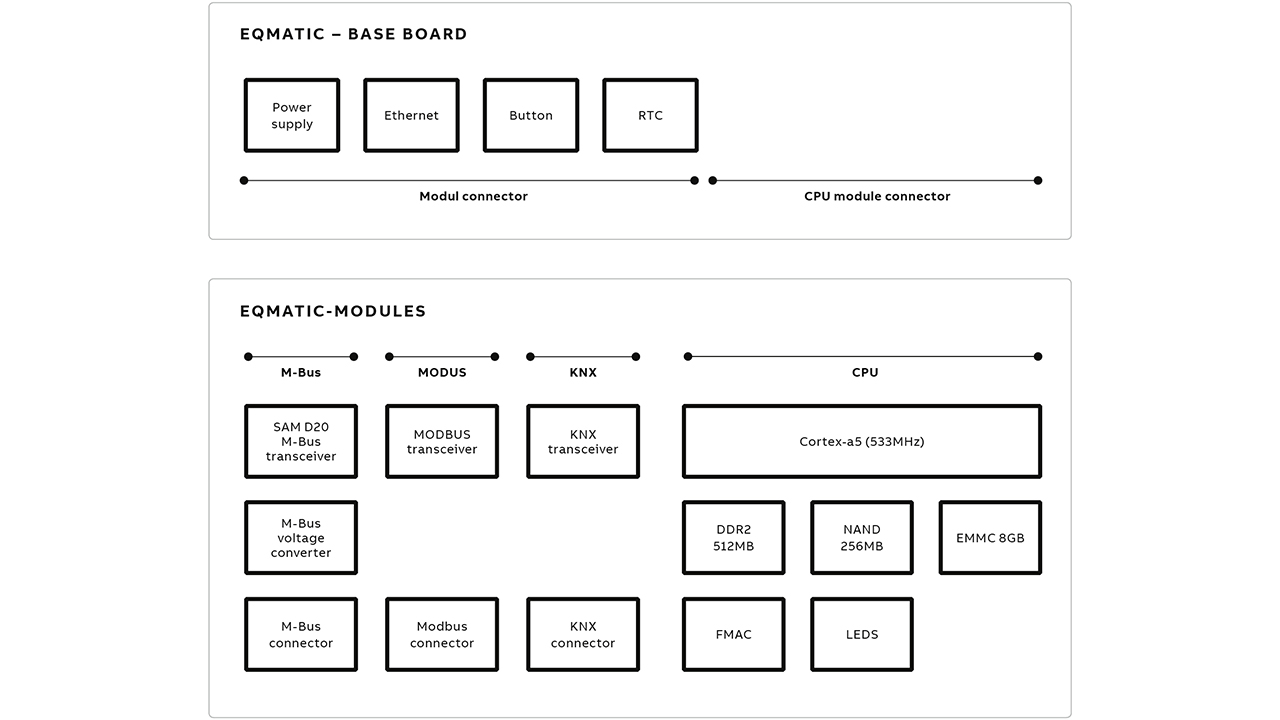
The core of the EQmatic Analyzer is a base module with a MICROCHIP SAMA5D3 Cortex-A5 processor. This processor is equipped with 512 MB of DDR2 Random-access memory (RAM) with 256 MB NAND memory available for the operational system. There is an additional 8 GB eMMC flash for local storage. The hardware’s robust design, essential in today’s market, was confirmed by electromagnetic compatibility (EMC) laboratory tests performed according to International Energy Commission (IEC) standards.
Depending on the connected meter type, customers can choose between EQmatic M-Bus, MODBUS-RTU or KNX-TP communication protocols. All versions communicate with the external world over a Transmission Control Protocol (TCP)/Internet Protocol (IP). An ethernet link provides access to a web-user interface via a HTTP/HTTPS application protocol; this link is used to share data with external systems via Representational State Transfer Application Programming Interface (REST-API) or MODBUS TCP/IP →03.
EQmatic communication protocols
Recognizing the trend to foster cooperation between manufacturers and products; hardware and software and the interfaces between these components, ABB has designed EQmatic Analyzers to boost compatibility. Depending on the application, ABB’s EQmatic relies on Modbus-RTU, RS-485 standard, the Modbus/TCPm the M-Bus MDRC or the KNX protocol standards to ensure customers have the data diagnostic functions they require to reach their sustainability goals cost-effectively.
The M-Bus communication solution
The M-Bus is a standard protocol with a dedicated interface created for the remote reading of utility meters. In such a network there can only be one client device: the master. This master initiates commands with multiple servers, termed slaves; these servers respond to requests and commands; and provide data. Here, EQmatic fulfills the main role as client/master. In accordance with the M-Bus master requirements, EQmatic is able to power up to 64 meters, connected within a bus topology. All communication aspects related to the M-bus interface have been implemented in an external transceiver based on a MICROCHIP SAM D20 microprocessor. This chip has internal modules such as an A/D converter, D/A converter and analog comparator used to setup bus voltage references. Working with as little software as possible, EQmatic is able to create dynamic impedance, which is necessary to handle M-Bus communication.
The Modbus communication solution
By developing an EQmatic with Modbus communication, a standard serial communication protocol originally published by Modicom, ABB ensures compatibility with a variety of industrial electronic devices and prevalent high-level management systems, eg, Supervisory Control and Data Acquisition control system architecture (SCADA).
The Modbus-RTU RS-485 standard has been implemented to retrieve data from utility devices. Another variation, the Modbus/TCP provides communication through TCP/IP networks, which, by default, use port 502. The TCP Modbus allows the design of the client to be as simple as possible. Compared to the MODBUS-RTU, the Modbus TCP does not require checksum algorithms to verify the integrity of the data because lower-level software layers already provide checksum protection.
EQmatic Modbus/TCP acts as a data server that can be integrated with any client, eg, SCADA, to retrieve available data – a clear advantage. Moreover, the end user can employ any third party meter with this analyzer, even those meters with different register lists. The result is enhanced compatibility between devices.
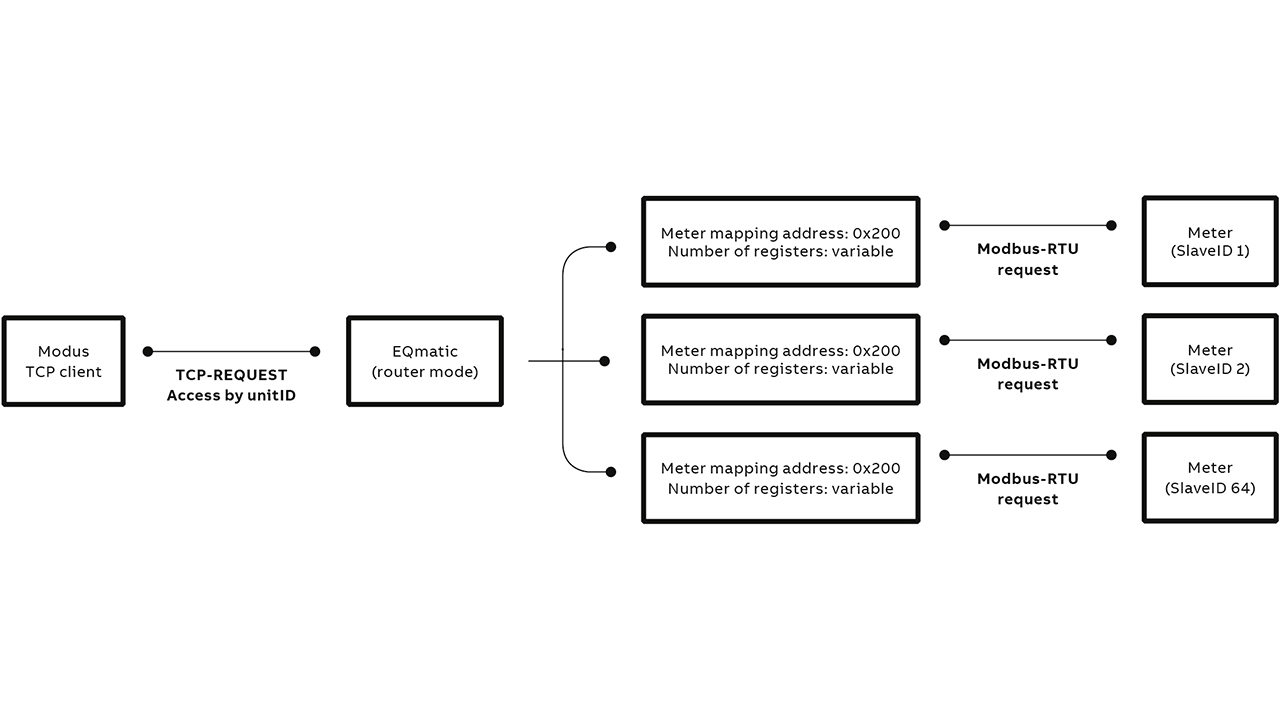
Further, to help customers get the most from EQmatic, ABB’s software provides users with two modes of data sharing: router mode and static mode. In the first mode, the software acts as a “router” to the meters and all meter data points are available in a Modbus/TCP register mapping →04. The request requires unitID (slaveID in MODBUS-RTU equivalent), the register address and number of registers. Additional information about data points like coding or multiplier are consistent and values are mapped in accordance with the meter types →04.
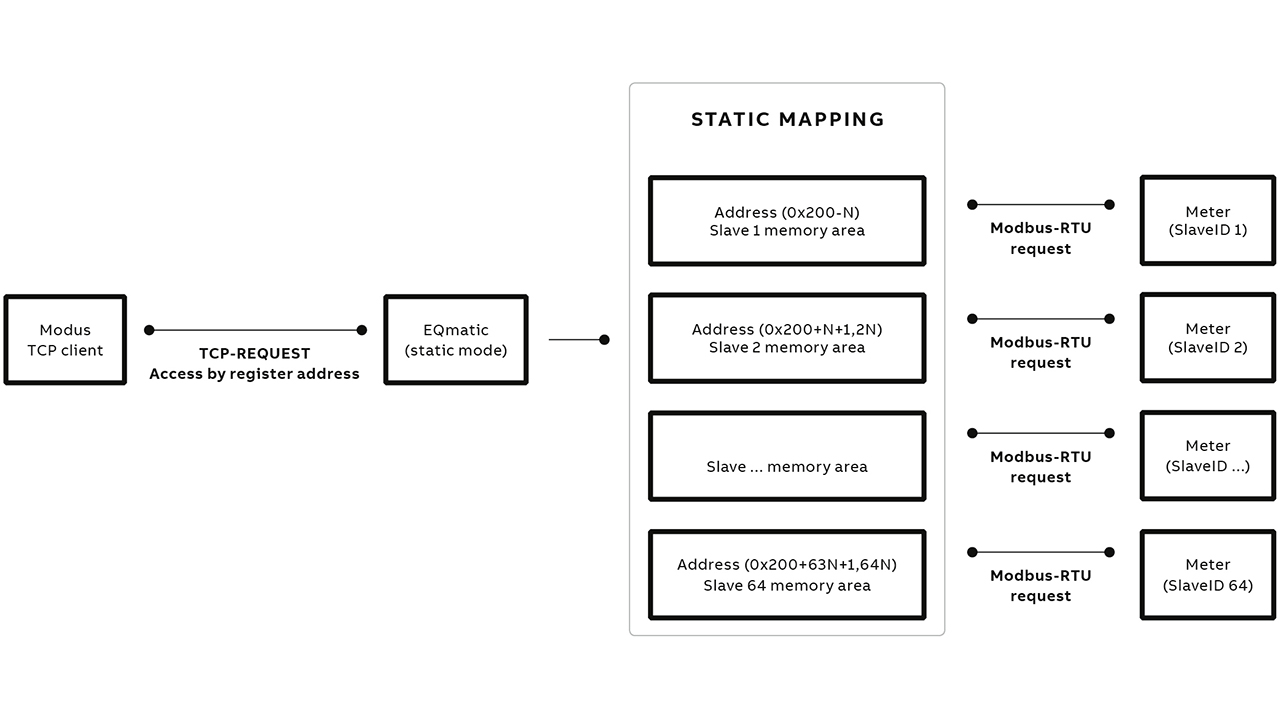
The second mode, “static register mapping”, permits the user to read all meter data points. Although usually an advantage, this ability can be unfavorable; such as a case in which a variety of coding is used for the same data point type; typically, the result of using diverse meter suppliers. EQmatic’s answer is to create a static register mapping, organized to provide linear addressing ability for every connected meter. All data points are predefined in EQmatic’s memory and each meter has a dedicated address space. This obviates the need to know the unit ID to receive the required data →05.
The KNX communication solution
The KNX is an open standard commonly used in commercial and domestic building automation systems to operate lighting, blinds, HVAC, audio systems or remote controls. The communication protocol can use twisted pair, Powerline or IP links. On such networks, there is no master device; interaction is achieved in distributed applications implemented via models with standardized data points and objects.
ABB’s EQmatic Analyzer uses twisted pair cabling to fetch the meters’ data and send control objects. The IP link is dedicated to speed up the downloading configuration, which is created in an ETS configuration tool delivered by KNX organization. This KNX Analyzer is the only device from the entire EQmatic range that provides customers with a load control function. To realize power management, EQmatic connects with end-devices like SE/S, by sending the load shedding stage. When power exceeds the configured limit for longer than the configured time, the controller sends the load shedding stage 1 to the KNX bus. If there is no follow-up reaction or the reaction is too small to drop the power below the limit, then the next shedding level, level 2, will be transferred. If the network contains a sub-device in which the shedding state is equal to that which QA/S sends, then the device switches off the line. Because up to eight shedding stage levels are possible, customers can easily and efficiently create a power control plan.
Added reliability with Linux
The EQmatic is controlled by an embedded software that runs on a customized Linux system due to this system’s track record of reliability and stability. The system contains a bootloader, a Linux kernel and the root file system. Thus, the complete system has been created with an opensource, easy-to-use and efficient Buildroot environment, where all components are collected and linked to the single Linux Image.
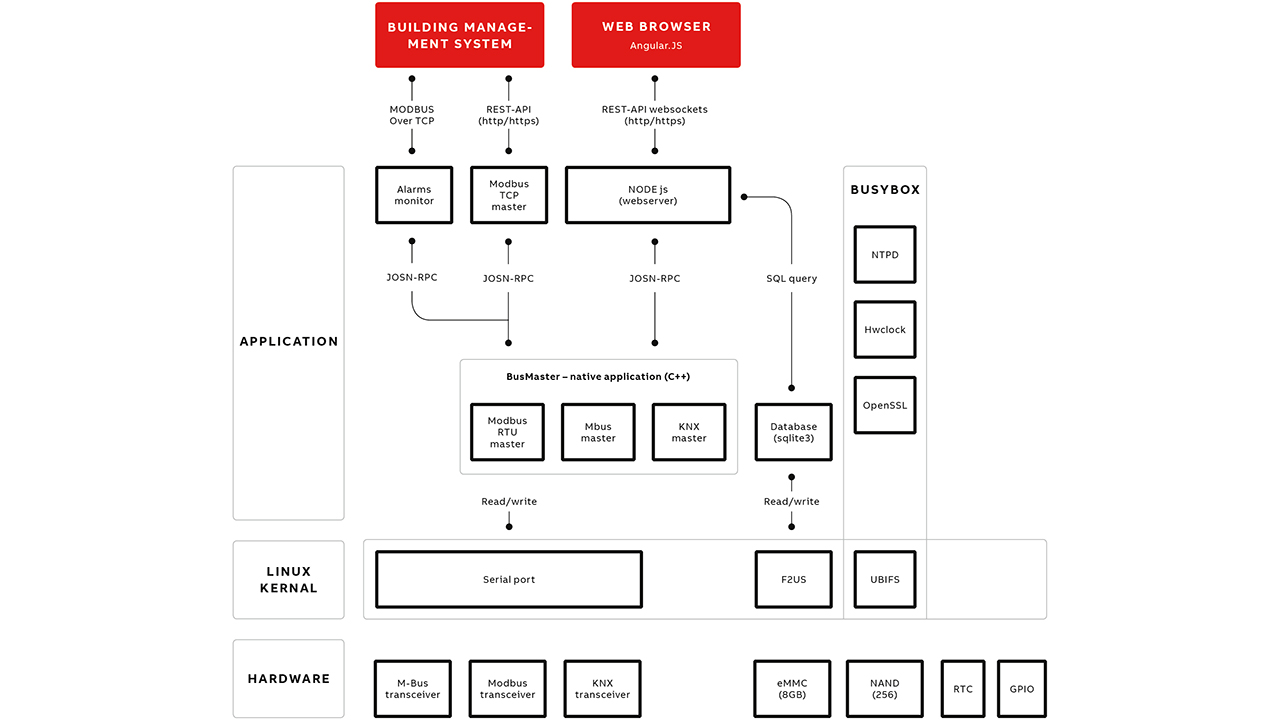
The system runs on a separate 256 MB NAND chip, and uses the UBIFS file system. Memory is divided into two 120 MB areas with two installed systems. During runtime, only one system is activated; it runs in read-only mode without the possibility to perform write operations. This setup improves product lifetime cycle since these memory types tend to degrade most when write operations are performed. Updating the system is a snap, the complete Linux Image is installed into the inactive memory compartment.
There is an additional eMMC memory with a capacity of 8GB that has both read and write permission; data is stored separate from other operations that require persistence. Having two different memory areas increases reliability by providing a separation between system operations and user activities.
Software architecture
Because the system has been designed to work under Linux control, the web-user-interface is realized in the application layer; it is based on Node.js (backend) together with Angular.js (frontend) →07. All communication differences between the three hardware variations are organized as a single process: BusMaster. The latter, a core for transferring data received from utility meters to a higher layer of application, is equipped with JSON-RPC with an easy extendable API. Thanks to this separation, ABB’s experts can easily add other services that use meter data to meet customer needs, eg, meter value monitors (alarms) or additional data sharing functionality – Modbus/TCP.

Web user interface
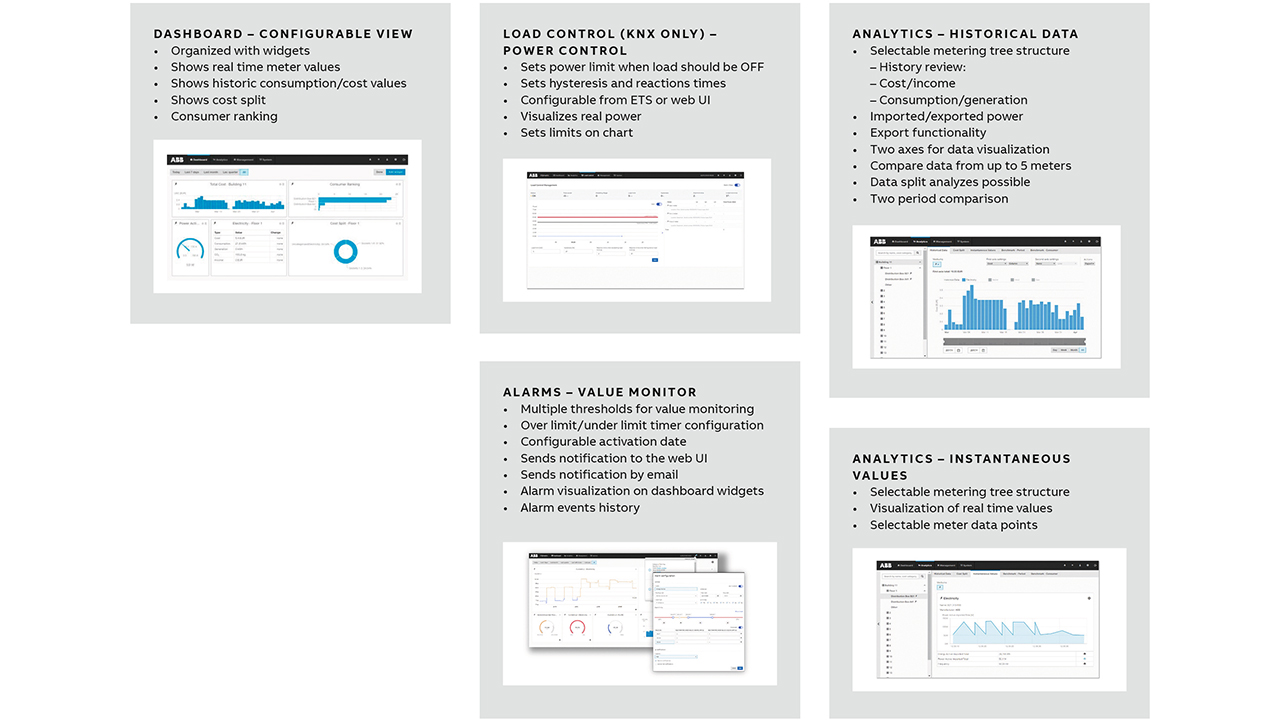
The user interface has been organized into four main sections: dashboard, analytics, management and system:
Dashboard contains:
• Freely configurable view for every system user via widgets
Analytics contains:
• Historic data – review history with several chart options
• Usage split – split history
• Instantaneous values – real meter values
• Benchmark period – historical periods
• Benchmark consumer – consumer’s history
• Reports – automatic/scheduled reports via email or FTP
• Alarms – value monitoring with notifications
• Manual data export (.csv, .xlsx, JSON, PDF)
Management contains:
• Meter management – add/remove data source from the system
• Metering structure – creates tree structure and assigns meters
• User management – creates administrator or normal user with limited access
• Tariffs and units – utility prices used for cost calculation
• Consumer groups – utility consumer
• Data sharing – User Modbus/TCP or REST/API to share data with external system
System contains:
• Data and time settings
• Network settings
• Update – select update package or configure automatic update server
• SMTP configuration – configure SMTP to allow sending emails
• SSL certificate – generate or upload SSL certificate
• Erase data – restore factory settings
• System log/diagnostics – history of events
Intelligent energy efficiency with EQmatic
By choosing an EQmatic model for their commercial or residential building, customers get a smart energy analyzer characterized by a full range of functionality: historical and instantaneous analysis as well as configurable dashboard views →08.
ABB’s EQmatic Energy Analyzers are just what customers need: these smart digitally connected and future-proof devices ensure the perpetual whole-building energy optimization to meet sustainability goals and cut costs.
Reference
[1] Buildings, Smarter Facility Management “Networked systems lead to greater energy efficiency”, 11 Jan. 2015, Available: https://www.buildings.com/article-details/articleid/19537/title/how-smart-buildings-save-energy, Accessed: 4 Feb. 2020.


